You just brought home a new USB mixer, and you can’t wait to impress your friends with it in an online jam session on FarPlay or in a conference call on Zoom, Skype, or FaceTime. You really do sound great to them, but they complain they hear an echo of themselves, and they track the problem down: it’s you. That’s weird. Sure, echo often happens when someone uses speakers instead of headphones, but you confirmed that you’re hearing the other participants through your headphones; their audio isn’t coming out of your speakers.
Is there a way to get rid of this echo? Why is this happening?
The fix is easy. There’s typically a button on the USB mixer you push to make the mixer stop sending a copy of the audio from the computer back into the computer. The name of the button varies between mixers. At FarPlay’s support session on Saturday October 26th, 2024, I showed attendees where the button was on the Mackie ProFX6v3. Check out the video below.
The steps are similar for common USB mixers:
Mackie ProFX6v3: Make sure the USB 3-4 button is OFF (not pushed in). Make sure the TO PHONES button is pushed in. Set the BLEND halfway between INPUTS and USB 1-2 (or to USB 1-2). Don’t set the BLEND to INPUTS. For more information, see the ProFX6v3’s manual.
Yamaha AG03/06 and AG03/AG06 Mk2: Set the TO PC switch to INPUT MIX, not LOOPBACK. Gradually raise the USB/computer level knob as needed to hear audio from the computer in your headphones. For more information, see Yamaha’s manuals for their AG03/06 mixers or their AG03/06 Mk2 mixers.
Alesis MultiMix 8 USB FX: Make sure the 2 TRK/USB TO MAIN button is not pushed in. Make sure the 2 TRK/USB TO MONITOR button is pushed in. For more information, see the MultiMix 8 USB FX’s manual.
Looking for the button on a different mixer? Search your mixer’s manual for keywords like livestreaming, webcasting, gaming, and loopback. Sending the audio from the computer back into the computer is called loopback. Livestreamers use loopback to let their audiences hear a mix of game audio, for example, with their voice, but loopback creates an echo in online conversations and jam sessions. In short, turn loopback off for sessions on FarPlay, Zoom, Skype, FaceTime, etc.
We’re hard at work on the next version of FarPlay. If you haven’t already, upgrade free to the latest version.
A little housekeeping: Shortly after Apple released macOS Sequoia 15.0, reports of issues with different firewall and network software began popping up. If you’re running into networking issues on Sequoia, go to your Mac’s Local Network settings and flick the switch to give FarPlay permission, as shown on our forum.
What’s packet re-requesting, and what does it have to do with recording?
Musician, composer, and FarPlay co-founder Dan Tepfer talks about packet re-requesting, a powerful new feature in FarPlay 1.3 that helps you make pristine recordings over a wider range of connections. Read the transcript on our blog.
Variations on Twinkle Twinkle: No. 1
Speaking of pristine recordings, Johan Eriksson Rapp and Anders Teglund return to our newsletter with the first of a series of variations on “Twinkle Twinkle Little Star”. They recorded the audio and video for this studio-quality single live in FarPlay, not separately, giving them the opportunity to relate organically in real-time. Listen to the stellar single on Spotify, Apple Music, and Amazon Music, or watch the video below.
Distansorkestern (“Distance Orchestra”) band members Johan and Anders are Swedish composers who use FarPlay to rehearse and record live from Falun and Kungsbacka, Sweden, 250 miles (400 km) apart.
Happy birthday, FarPlay monthly support sessions!
Thank you to our community for a wonderful year of FarPlay monthly support sessions. It’s been so much fun to help and meet you.
Songwriter/producer Maat Hotep came to our session on September 14th, 2024 to find out what it takes to get started with FarPlay. Watch highlights below and visit our QuickStart guide.
Sign up for our support session on Saturday October 26th 2:00pm-3:30pm New York time (8:00pm-9:30pm Central European time). Monthly tech-support sessions are available free to paid subscribers.
Get in touch
Do you love FarPlay and have experience with marketing? Would you be interested in helping us with our mission of making low-latency audio available to everyone by helping us spread the word? If so, email us at contact@farplay.io.
We’ve been loving featuring our amazing users. If you’d like to be included — whether you use FarPlay for lessons, rehearsals, jam sessions, or conversations — we’d love to talk to you. You can let us know by emailing us at contact@farplay.io.
If you’d like to ask tech-support questions, our forum is the fastest way to reach us. If you need to reach us privately, email us at support@farplay.io — we’re happy to help!
Musician, composer, and FarPlay co-founder Dan Tepfer talks about packet re-requesting, a powerful new feature in FarPlay 1.3.
Read the transcript
Hi, I’m Dan Tepfer. I’m co-founder of FarPlay with Anton Runov. I’m also a musician and composer. I actually use FarPlay all the time in my music, and I want to talk to you about a feature that we’re introducing in FarPlay 1.3 that I’m super excited about. It’s an under-the-hood-type feature. And so I want to take the time to explain it because it’s so important.
So this feature is called “Packet Re-Requesting.”
FarPlay is amazing at minimizing the latency, the amount of time between when you make a sound and your partner or your friend hears it through the internet. And this presents a lot of challenges. The way audio data is sent through the internet is in little chunks, and these chunks are called “packets.” So you’re over here and you’re sending this constant stream of packets over to your friend. And since we’re trying to minimize latency as much as possible, you might think that as soon as you receive a packet over here, we would want to play it right away into the headphones of your friend. But if you did that, you’d run into a really big problem, which is that the internet is a complicated place. Conditions change all the time. There’s congestion, and the amount of time that it takes for a packet to get from you to your friend can vary, and that’s called “jitter.” So, to compensate for that on the receiving end, we introduce what’s called a “buffer,” and that’s just a little bit of a waiting period before you play packets that have arrived. And the purpose of that is that, thanks to that little waiting period, once you finish playing that first packet, it’s very likely that the second packet will have already arrived. And so you can play an unbroken stream of audio.
Now, FarPlay is super powerful in that we give you complete control over the length of that buffer. That’s what changing the latency slider does. And so you can choose to make that buffer super, super short and to play packets almost as they arrive. And as a tradeoff, you’re probably going to hear some static in your headphones. They’re going to be some packets that won’t have arrived yet, and that’s just something you control. You can control it however you want.
And that’s all well and good for playing music, but one of the great things that FarPlay does is it makes recordings. You know, we can make studio-quality recordings with separate stems. And so in that recording, you can’t tolerate static, right? You need really clean audio. And so what we do is, instead of using that super-short buffer that you’re using for your own monitoring, we have a separate really long buffer that we use for the recording. And so the hope is that that buffer is so long that by the time the recording is made, all the packets will have arrived, even the very delayed ones, because of the jitter.
But, actually, you run into a problem with that approach. And that problem is that some packets on the internet, for complicated reasons, simply never arrive. It’s like the mail. You send a letter; there’s always a chance that it will never arrive. And so they just are gone. You’ll never get them. And so what’s the solution to that?
Well, in FarPlay, 1.3, we implemented the system that re-requests packets. So on the receiving end, if a packet hasn’t arrived by a certain time, we send a message to the sending end saying, “Hey, we never got that packet. Could you send it again?” And so it gets sent again, and then it gets slotted into the recording at exactly the right spot. And what we have now with FarPlay 1.3 is that even under challenging network conditions, you can guarantee, within limits, but, basically, for most connections, you can absolutely guarantee a pristine studio-quality recording. And I’m super excited that we’ve finally implemented this. This is something we’ve been wanting to implement for a long time, and hope you find it as useful as I do.
When we got the first report that FarPlay app failed to connect after upgrading to Sequoia 15.0, we checked the logs and found that most users who upgraded hadn’t experienced issues, so we thought it might be a one-off case. But after receiving several more complaints it became clear: we had a problem.
FarPlay is an app that allows musicians to make music online interactively. This requires much lower latency than common audio/video conferencing apps provide. To make online jamming feel like you’re in the same room, end-to-end latency needs to be below 20-30ms. That’s why FarPlay relies exclusively on peer-to-peer (P2P) technology. It allows us to use the shortest and the fastest possible path to deliver audio data from one side to another. But P2P connectivity depends strongly on firewall behavior. Firewalls that are too restrictive or incorrectly configured can easily make P2P connections impossible.
Shortly after Apple released macOS Sequoia 15.0, reports of issues with different firewall and network software began popping up. Customers of large security software companies like CrowdStrike, ESET, and SentinelOne reported issues. Some VPNs stopped working too. For some FarPlay users, it looked as though their firewalls just started blocking audio traffic entirely even when their firewalls were turned off completely in system settings. At the same time, others didn’t experience any issues. I was not able to reproduce the problem on my test Mac.
We are a very small company, just a few people. If IT security giants couldn’t solve the issue, what could we do? About 60% of our users are on Mac, and even if only 10% were affected, it could have been disastrous for us. When P2P connectivity is broken, FarPlay simply can’t work. A music teacher can’t provide a scheduled lesson. Musicians can’t conduct their final rehearsal before a concert.
We began researching the changes in the new version of macOS and discovered that the new “Local Network” section in the “Privacy & Security” settings affects FarPlay connectivity. This setting has existed in iOS for a while and has now been added to macOS. Normally, it would only be required for connecting FarPlay clients within the same local network. However, we found that enabling this setting for the FarPlay app also resolved the connectivity issues for users affected by the Sequoia firewall problem.
So, if you have a networking issue with Sequoia, check out the Local Network section of Privacy & Security settings. I can’t say if this helps with other Sequoia issues, but it was a lifesaver for us. Shortly after we published this workaround on our support forum, other users confirmed that it worked for them as well.
Just recently, Apple released Sequoia bugfix version 15.0.1. As usual, its description is vague, it says it “improves compatibility with third-party security software”. We don’t have enough data yet to say if our problem was fixed with this update. Our users already had a solution at that point.
Many thanks to everyone who enthusiastically tested FarPlay 1.3 beta. Team work pays off, and we’re thrilled to release FarPlay 1.3. This major update makes it easy to use multiple audio input devices at the same time, add reverb to individual tracks in the mixer, and make pristine recordings over a wider range of network connections thanks to built-in error correction. Version 1.3 also comes with design improvements that make it more convenient to access important features.
Bring audio from multiple sources into FarPlay at the same time
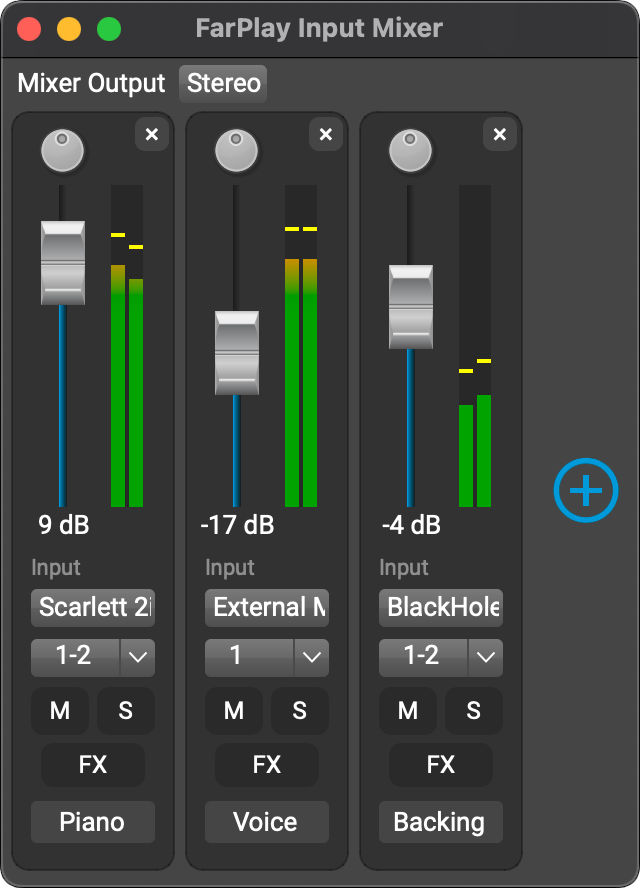
FarPlay 1.3’s upgraded mixer, available to all users, lets you mix audio from multiple audio input devices. This makes it easy to bring in background music from another app, play on an instrument connected to an audio interface, and talk through a separate mic, all at the same time.
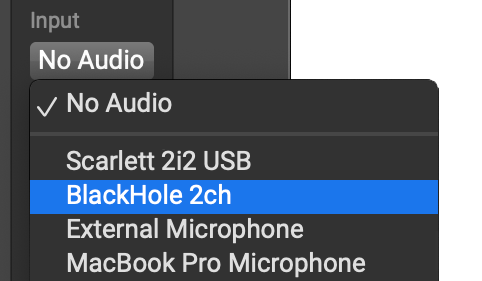
Simply use the Input pull-down menu for a track to select the device you want that track to use.
For step-by-step instructions, including how to send system audio on Mac and Windows to the input mixer, see our updated mixer instructions.
Reverb
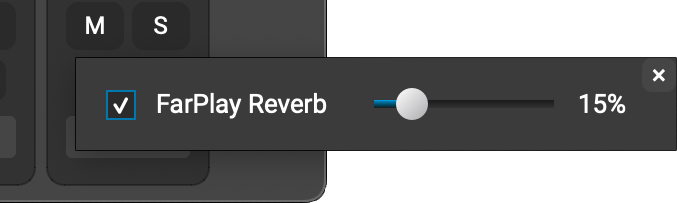
FarPlay’s upgraded mixer also introduces ultra-low-latency reverb you can adjust on a track-by-track basis. Click the FX button for a track. Check the FarPlay Reverb checkbox and drag the slider to adjust the amount of reverb for the track. That’s it!
Pristine recordings over a wider range of network connections
FarPlay has been great for professional remote audio production and is even better at it now.
Since version 0.3.5, FarPlay’s recording feature has used a large buffer delay to produce high-quality recordings, even for network connections with unstable latencies. With version 1.3, we’re introducing a new packet re-requesting system to provide pristine recordings over an even wider range of network connections.
Learn more about these error-correction technologies here.
Improved design means more convenience
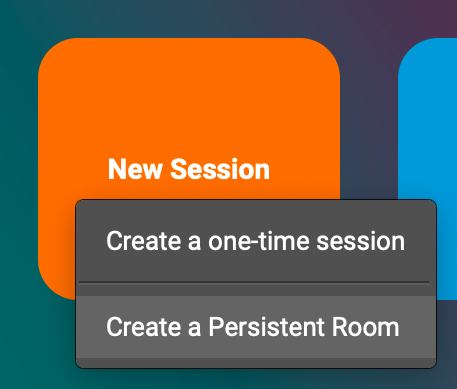
Subscribers can create a Persistent Meeting room by clicking the New Session button or through the Session menu. Either way, there’s no need to leave the app.
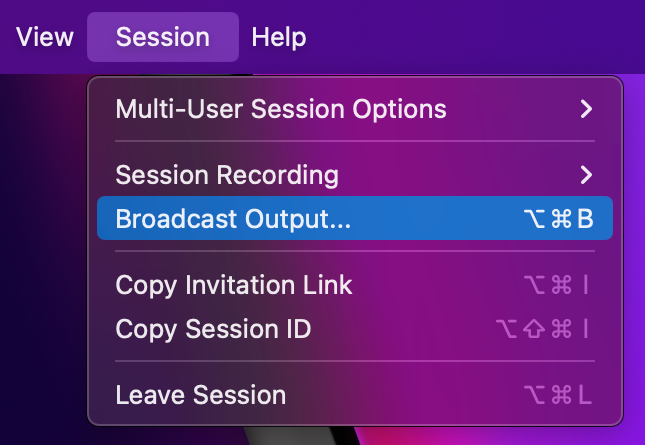
And, Broadcast Output is now easier to find and more intuitive to use with its own window and menu item.
These are just some examples of how we’ve made it easier to access important FarPlay features. For more information, visit our new accessibility page, which explains how to use FarPlay with a screen reader and keyboard navigation (including keyboard shortcuts).
Next monthly support session
Want to see how to send system audio into FarPlay? Watch the highlights from our July session below, or better yet, join us for the next one!
Sign up for our support session on Saturday August 24th 2:00pm-3:30pm New York time (8:00pm-9:30pm Central European time). Monthly tech-support sessions are available free to paid subscribers.
Get in touch
We’ve been loving featuring our amazing users. If you’d like to be included — whether you use FarPlay for lessons, rehearsals, jam sessions, or conversations — we’d love to talk to you. You can let us know by emailing us at contact@farplay.io.
If you’d like to ask tech-support questions, our forum is the fastest way to reach us. If you need to reach us privately, email us at support@farplay.io — we’re happy to help!
We invite your feedback for FarPlay 1.3.0, now available in beta. This beta features an upgraded input mixer, which supports using multiple audio devices at the same time. We’ve also upgraded audio and video recording to provide pristine recording quality over a much wider range of network conditions (even with noticeable packet loss). Please note that the Mac version of this beta requires macOS 11 Big Sur or higher.
For critical uses, we recommend using FarPlay’s latest stable release, which remains version 1.2.7.
Teaching trumpet on FarPlay, “like in real life”
Davide Pianegonda explains why FarPlay is so important for teaching trumpet online: it allows him and his students “to play together, and it’s in real time.” Davide has played in prestigious orchestras, including as a Disney artist and on Italian national television. Find out more about Davide at Corso Di Tromba and watch his interview below.
Uptempo jazz, 400 miles apart
Saxophonist Petr Cancura in Ottawa and pianist Dan Tepfer in Brooklyn, NY play an uptempo version of the jazz standard Billie’s Bounce, in real time, 400 miles apart. Watch their performance below, a great demo of the level of intricate, rhythmic playing that’s possible over FarPlay at that distance.
Petr is Director of the Ottawa Jazz Festival Program, and Dan is co-founder of FarPlay. For more information about this session, read the rave review of FarPlay from Recording Magazine.
Next monthly support session: July 20
We had a great time at our May and June monthly support sessions. Did you know you can try to get more upload speed with a business internet plan? Watch the highlights from our May session below, or better yet, join us for the next one!
Sign up for our support session on Saturday July 20th 2:00pm-3:30pm New York time (8:00pm-9:30pm Central European time). Monthly tech-support sessions are available free to paid subscribers.
Get in touch
We’ve been loving featuring our amazing users. If you’d like to be included — whether you use FarPlay for lessons, rehearsals, jam sessions, or conversations — we’d love to talk to you. You can let us know by emailing us at contact@farplay.io.
If you’d like to ask tech-support questions, our forum is the fastest way to reach us. If you need to reach us privately, email us at support@farplay.io — we’re happy to help!
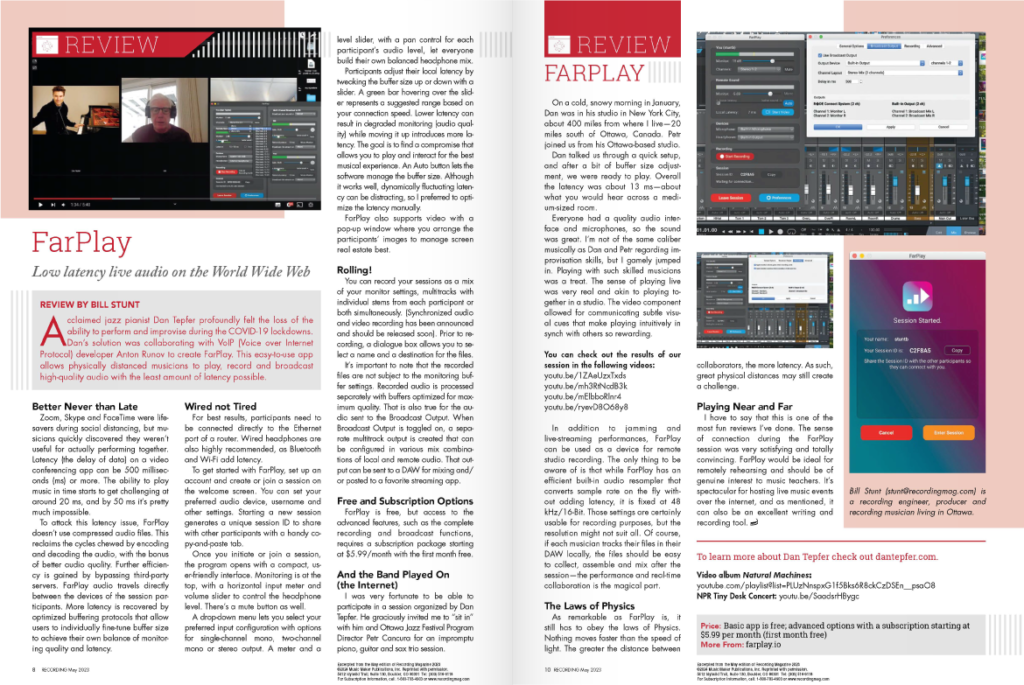
We’re proud to be featured in Recording Magazine, which has published monthly audio-technology news and reviews to help musicians “make the best recordings possible” since 1987. Writer Bill Stunt, a veteran radio production manager living near Ottawa, Canada, tested FarPlay out in real-world circumstances by playing a session with saxophonist Petr Cancura in Ottawa and pianist Dan Tepfer in Brooklyn, New York, 400 miles away. He gave FarPlay a rave review, remarking that “the sense of playing live was very real and akin to playing together in a studio,” and that “FarPlay would be ideal for remotely rehearsing and should be of genuine interest to music teachers.”
Read the full review here, or in the text below. To read the full May 2023 issue, head over to Recording Magazine.
FarPlay: Low latency live audio on the World Wide Web REVIEW BY BILL STUNT
Acclaimed jazz pianist Dan Tepfer profoundly felt the loss of the ability to perform and improvise during the COVID-19 lockdowns. Dan’s solution was collaborating with VoIP (Voice over Internet Protocol) developer Anton Runov to create FarPlay. This easy-to-use app allows physically distanced musicians to play, record and broadcast high-quality audio with the least amount of latency possible.
Better Never than Late Zoom, Skype and FaceTime were life-savers during social distancing, but musicians quickly discovered they weren’t useful for actually performing together. Latency (the delay of data) on a video conferencing app can be 500 milliseconds (ms) or more. The ability to play music in time starts to get challenging at around 20 ms, and by 50 ms it’s pretty much impossible. To attack this latency issue, FarPlay doesn’t use compressed audio files. This reclaims the cycles chewed by encoding and decoding the audio, with the bonus of better audio quality. Further efficiency is gained by bypassing third-party servers. FarPlay audio travels directly between the devices of the session participants. More latency is recovered by optimized buffering protocols that allow users to individually fine-tune buffer size to achieve their own balance of monitoring quality and latency.
Wired not Tired For best results, participants need to be connected directly to the Ethernet port of a router. Wired headphones are also highly recommended, as Bluetooth and Wi-Fi add latency. To get started with FarPlay, set up an account and create or join a session on the welcome screen. You can set your preferred audio device, username and other settings. Starting a new session generates a unique session ID to share with other participants with a handy copy-and-paste tab. Once you initiate or join a session, the program opens with a compact, user-friendly interface. Monitoring is at the top, with a horizontal input meter and volume slider to control the headphone level. There’s a mute button as well. A drop-down menu lets you select your preferred input configuration with options for single-channel mono, two-channel mono or stereo output. A meter and a level slider, with a pan control for each participant’s audio level, let everyone build their own balanced headphone mix. Participants adjust their local latency by tweaking the buffer size up or down with a slider. A green bar hovering over the slider represents a suggested range based on your connection speed. Lower latency can result in degraded monitoring (audio quality) while moving it up introduces more latency. The goal is to find a compromise that allows you to play and interact for the best musical experience. An Auto button lets the software manage the buffer size. Although it works well, dynamically fluctuating latency can be distracting, so I preferred to optimize the latency manually. FarPlay also supports video with a pop-up window where you arrange the participants’ images to manage screen real estate best.
Rolling! You can record your sessions as a mix of your monitor settings, multitracks with individual stems from each participant or both simultaneously. (Synchronized audio and video recording has been announced and should be released soon). Prior to recording, a dialogue box allows you to select a name and a destination for the files. It’s important to note that the recorded files are not subject to the monitoring buffer settings. Recorded audio is processed separately with buffers optimized for maximum quality. That is also true for the audio sent to the Broadcast Output. When Broadcast Output is toggled on, a separate multitrack output is created that can be configured in various mix combinations of local and remote audio. That output can be sent to a DAW for mixing and/or posted to a favorite streaming app.
Free and Subscription Options FarPlay is free, but access to the advanced features, such as the complete recording and broadcast functions, requires a subscription package starting at $5.99/month with the first month free.
And the Band Played On (the Internet) I was very fortunate to be able to participate in a session organized by Dan Tepfer. He graciously invited me to “sit in” with him and Ottawa Jazz Festival Program Director Petr Cancura for an impromptu piano, guitar and sax trio session. On a cold, snowy morning in January, Dan was in his studio in New York City, about 400 miles from where I live—20 miles south of Ottawa, Canada. Petr joined us from his Ottawa-based studio. Dan talked us through a quick setup, and after a bit of buffer size adjustment, we were ready to play. Overall the latency was about 13 ms—about what you would hear across a medium-sized room. Everyone had a quality audio interface and microphones, so the sound was great. I’m not of the same caliber musically as Dan and Petr regarding improvisation skills, but I gamely jumped in. Playing with such skilled musicians was a treat. The sense of playing live was very real and akin to playing together in a studio. The video component allowed for communicating subtle visual cues that make playing intuitively in synch with others so rewarding.
In addition to jamming and live-streaming performances, FarPlay can be used as a device for remote studio recording. The only thing to be aware of is that while FarPlay has an efficient built-in audio resampler that converts sample rate on the fly without adding latency, it is fixed at 48 kHz/16-Bit. Those settings are certainly usable for recording purposes, but the resolution might not suit all. Of course, if each musician tracks their files in their DAW locally, the files should be easy to collect, assemble and mix after the session—the performance and real-time collaboration is the magical part.
The Laws of Physics As remarkable as FarPlay is, it still has to obey the laws of Physics. Nothing moves faster than the speed of light. The greater the distance between collaborators, the more latency. As such, great physical distances may still create a challenge.
Playing Near and Far I have to say that this is one of the most fun reviews I’ve done. The sense of connection during the FarPlay session was very satisfying and totally convincing. FarPlay would be ideal for remotely rehearsing and should be of genuine interest to music teachers. It’s spectacular for hosting live music events over the internet, and as mentioned, it can also be an excellent writing and recording tool.
This is an intermediate release — no shiny new features but some important improvements under the hood. We fixed a bug that occasionally affected webcam access for some Windows users. We’ve also made some minor improvements to stability. Please upgrade now (upgrades are always free).
Next monthly support session: May 25
Did you know you can reduce latency by quitting other applications on your computer? Watch the highlights from our last session below, or better yet, join us for the next one!
Sign up for our support session on Saturday May 25 2:00pm-3:30pm New York time (8:00pm-9:30pm Central European time). Monthly tech-support sessions are available free to paid subscribers.
This brass duet is on fire!
Welcome back to Gomalan Brass Quintet members Marco Pierobon and Stefano Ammannati. Marco (trumpet, Parma, Italy) and Stefano (tuba, 120 km away, in Genova, Italy) used FarPlay to perform a killer brass rendition of Ennio Morricone’s version of “Crave” by Jelly Roll Morton. Watch their performance below.
Baroque improv over 210 miles
Tina Chancey plays the Baroque violin in Arlington, VA with Larry Molinaro on harpsichord in Falls Church, VA and our very own Dan Tepfer on piano in Brooklyn, NY. Watch their performance below.
Get in touch
We’ve been loving featuring our amazing users. If you’d like to be included — whether you use FarPlay for lessons, rehearsals, jam sessions, or conversations — we’d love to talk to you. You can let us know by emailing us at contact@farplay.io. For tech-support questions, our forum is the fastest way to reach us. If you need to reach us privately, email us at support@farplay.io — we’re happy to help!
A few lucky users found out about FarPlay 1.2.6 before we announced its release in our last newsletter. How? They came to our March support session! Want in? There’s still time to sign up for our April 20th support session below. Support sessions are free to subscribers.
If you haven’t already, upgrade to the latest version of FarPlay. Upgrading is always free!
Next monthly support session: April 20
We got a lot done (and had fun doing it) at FarPlay’s sixth monthly tech-support session on March 23rd. Corinne Bach and two of her voice students learned about using our QuickStart instructions to configure and test audio before lessons. Watch our highlights reel below to learn more.
Sign up for our support session on Saturday April 20th 2:30pm-4:00pm New York time (8:30pm-10:00pm Central European time). Monthly tech-support sessions are available free to paid subscribers.
Chopin, but make it jazz
We’re happy to feature another performance by Johan Eriksson’s jazz trio. This time, they’re playing a stunning rendition of Chopin’s Prelude in D Major. Just as before, all three players are playing together live, and their audio tracks have not been re-synched to each other after the fact.
Johan is a composer from Falun, Sweden who uses FarPlay to rehearse and record online with Anders Teglund in Kungsbacka, Sweden and Marcus Innala in Kalix, Sweden. The trio’s rehearsals span 1100 km (680 miles). Watch their performance below.
Get in touch
We’ve been loving featuring our amazing users. If you’d like to be included — whether you use FarPlay for lessons, rehearsals, jam sessions, or conversations — we’d love to talk to you. You can let us know by emailing us at contact@farplay.io. For tech-support questions, our forum is the fastest way to reach us. If you need to reach us privately, email us at support@farplay.io — we’re happy to help!
We’ve been amazed to see so many of you using FarPlay to make music together in large groups. We’re listening to your feature requests, and FarPlay 1.2.6 makes multi-user sessions easier by introducing collapsible user subpanels, persistent multi-user pan and gain settings, an audio limiter, as well as other design improvements. Upgrade here. Upgrading is always free!
Collapsible user subpanels
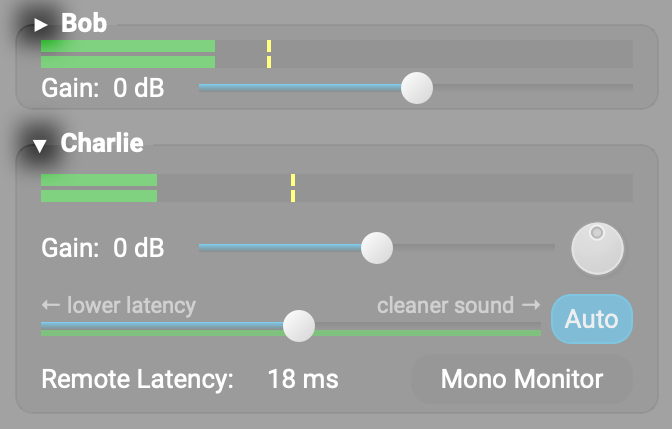
We’ve introduced the ability to collapse user subpanels. For larger ensembles, this means a lot less scrolling when navigating pan, gain, and latency settings for remote participants. FarPlay displays 10 collapsed user subpanels without scrolling.
To switch betweenfull-sized and compact views of a participant’s subpanel, click the triangle next to that participant’s name.
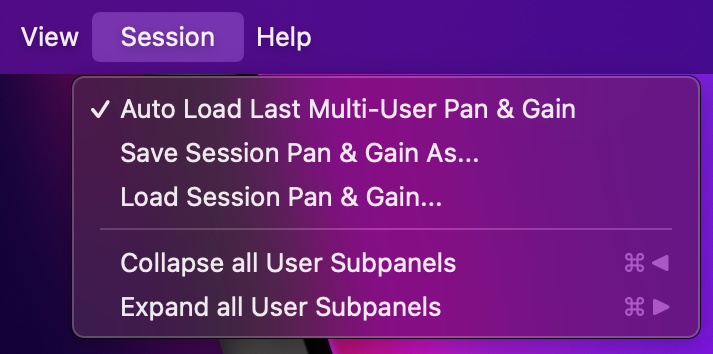
To collapse all subpanels, hit Command + Left arrow (on Mac) or Control + Left arrow (on Windows). Expand all subpanels using Command/Control + Right arrow. You can also use the Session menu, as described in our tutorial for multi-user sessions.
Persistent multi-user pan and gain settings
FarPlay 1.2.6 can remember pan and gain settings from multi-user sessions. If you meet regularly with an ensemble, this feature lets you avoid readjusting pan and gain for each session.
To use, go to the Session menu and verify that Auto Load Last Multi-User Pan & Gain is checked. You can also save pan and gain settings to a file or load pan and gain settings from a file using the same menu. Learn more at our tutorial for multi-user sessions.
Audio limiter and 3D panning
FarPlay 1.2.6 helps make listening to multi-user sessions more comfortable.
When doing sessions with multiple people, the combined audio from everyone involved can sometimes get loud. To prevent clipping in your headphones, we’ve introduced a gain limiter to the output monitor. We’ve also added the limiter to the input mixer, mix recording, and broadcast output.
By default, FarPlay applies standard panning as found in most DAWS. We’ve also included the option to add a 3D effect to the panning so that remote participants can be positioned in space around you. If you choose to use this, you can adjust the strength of the 3D effect in preferences.
To explore settings for the limiter and 3D panning, go to the Preferences window and choose the Advanced tab. To learn more, see our instructions for the limiter and 3D panning.
Get in touch
We’ve been loving featuring our amazing users. If you’d like to be included — whether you use FarPlay for lessons, rehearsals, jam sessions, or conversations — we’d love to talk to you. You can let us know by emailing us at contact@farplay.io. For tech-support questions, our forum is the fastest way to reach us. If you need to reach us privately, email us at support@farplay.io — we’re happy to help!